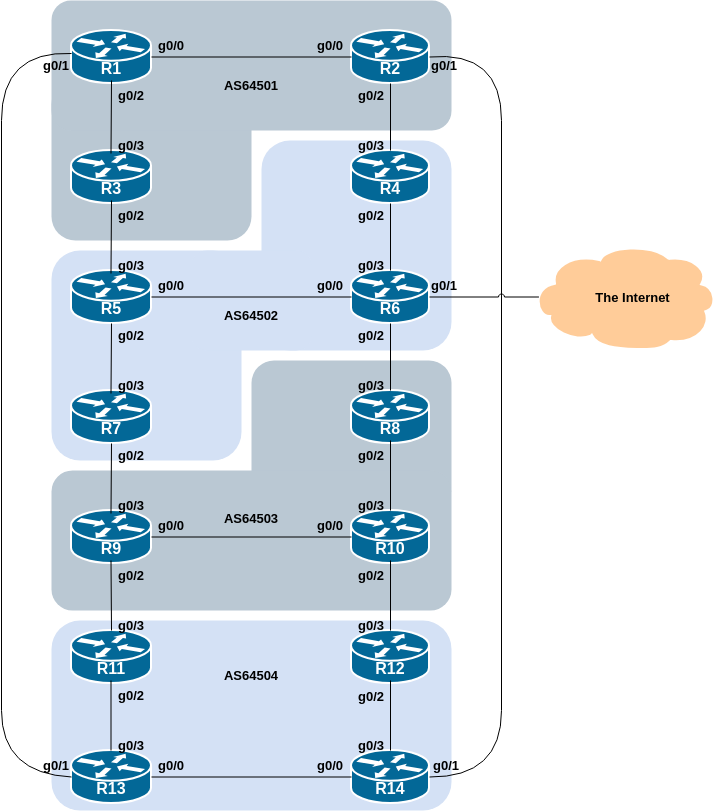
This lab is the second in a series demonstrating how to filter BGP announcements between neighbouring ASes. Four techniques will be covered in this series: prefix-list, as-path filters, route-maps and BGP communities.
The following common topology is used for this lab.
Before we start this lab, we need to clean up from the prefix filter lab we just completed, ready to test the AS_PATH filtering example.
The following shows what needs to be done in configuration mode:
router bgp 6450X
 address-family ipv4
  no neighbor <ebgp-peer> prefix-list <v4outlist> out
  no neighbor <ebgp-peer> prefix-list <v4inlist> in
 address-family ipv6
  no neighbor <ebgp-peer> prefix-list <v6outlist> out
  no neighbor <ebgp-peer> prefix-list <v6inlist> in
!
no ip prefix-list <v4outlist>
no ip prefix-list <v4inlist>
no ipv6 prefix-list <v6outlist>
no ipv6 prefix-list <v6inlist>
end
Replace the X and entries in <brackets> with the names you used.
Once you have done this, remember to do the Route Refresh on the EBGP sessions! (It’s simplest just to do clear bgp all <ext-AS> in and clear bgp all <ext-AS> out.) After that the full BGP table should be restored and you will see all the routes in the network again.
This lab configures route filtering based on AS path. This is done using AS path access-lists, and is another method of controlling networks which are exchanged in BGP peerings.
The following example shows a possible configuration for Router14 for its peering with Router2:
ip as-path access-list 1 permit ^$
ip as-path access-list 1 deny .*
!
ip as-path access-list 2 permit ^64501$
ip as-path access-list 2 deny .*
!
router bgp 64504
 address-family ipv4
  network 100.68.4.0 mask 255.255.255.0
  neighbor 100.68.4.9 remote-as 64501
  neighbor 100.68.4.9 description EBGP peering with Router1
  neighbor 100.68.4.9 filter-list 1 out
  neighbor 100.68.4.9 filter-list 2 in
!
 address-family ipv6
  network 2001:DB8:4::/48
  neighbor 2001:DB8:4:5::1 remote-as 64501
  neighbor 2001:DB8:4:5::1 description EBGP peering with Router1
  neighbor 2001:DB8:4:5::1 filter-list 1 out
  neighbor 2001:DB8:4:5::1 filter-list 2 in
!
Use this example to design a configuration for your EBGP peering with your external neighbour. Note that Cisco IOS does not have named AS_PATH filters, which makes the configuration somewhat less friendly to manage1.
Note that Router2 and Router9 have two EBGP neighbours, in different ASes. In this case we can use the same outbound AS Path filter for each peering, but we’d need to create two separate inbound AS_Path filters.
Question: Why does the outbound filter list match the null AS_PATH and not the local AS number in the above examples?
Answer: Because the local AS is only added to the AS_PATH attribute when the prefix is announced to an EBGP peer. If the local AS was included in the outbound filter-list configuration, the prefixes would be ignored as their AS_PATH attribute would not be set at that stage
Note 1: an IOS AS_Path filter always has an implicit deny as the last statement even though it is not listed in the configuration. Some ISPs add the implicit deny as they consider it good practice and a security precaution.
Note 2: these AS_Path filters are only applied to peerings with other ASes. These are called external peerings (using EBGP). There is usually no need to apply such filters for IBGP peerings.
Once your filters are in place, what do you see?
You should only see prefixes from your immediately adjacent ASes. You will no longer see any prefixes from ASes that are not directly connected. Which means:
AS64501 will no longer be able to see AS64503 (and vice-versa)
AS64502 will no longer be able to see AS64504 (and vice-versa)
Confirm that this is indeed the case.
Question: What is the difference between the BGP table and what you saw when you were doing prefix-filtering on your EBGP session?
Answer: This time you will see not only the aggregates from your neighbouring ASes, but also all the subnets of the aggregates - this is because we allow any prefix originated by the adjacent AS, not just the specific prefix as per in the prefix-filtering example.
Other implementations which use Cisco IOS style command line interface and syntax do have named AS_PATH filters.↩︎