Using the network configured in the previous lab, this lab is the first in a series demonstrating how to filter BGP announcements between neighbouring ASes. Four techniques will be covered in this series: prefix-list, as-path filters, route-maps and BGP communities.
The pre-requisites for this lab is that the EBGP lab has been completed and the instructors have presented the BGP Policy presentation.
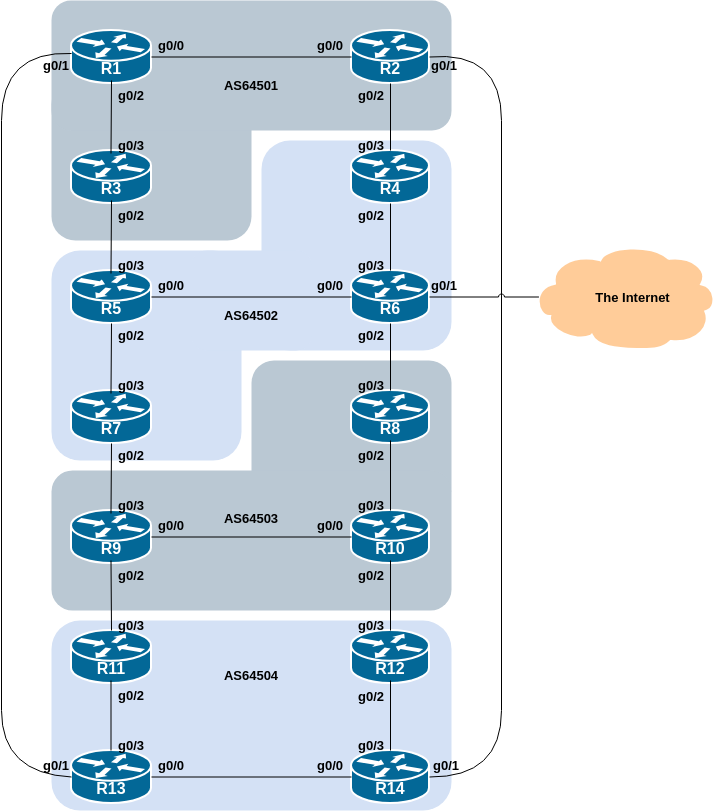
The following common topology is used for this lab.
The previous lab provided an introduction to setting up external BGP, but provided no way of controlling which networks are announced to which AS. The purpose of this module is to introduce the student to the types of routing policy which are available using BGP.
In the following series of labs we will configure each AS to become a non-transit AS, i.e. the AS won’t allow a connecting AS’s traffic to traverse it to reach another connecting AS. This will mean disconnectivity in the classroom – for example, AS64503 will no longer be able to see any networks from AS64501, etc. This is a deliberate policy to demonstrate the effectiveness of the BGP filtering being employed.
In the first example, we achieve this by configuring an outgoing route filter to allow only local prefix(es) be sent to EBGP peers. At the same time, we also make sure that our peers only send us their own prefixes. We guarantee this by configuring an incoming filter. In general, it is good practice to configure filters in both directions to protect against misconfiguration at both ends of the peering.
In the second example we use AS_PATH filters to achieve the same outcome.
And in the third example, we make use of BGP communities to achieve the same effect.
The final two examples show more advanced BGP policy configuration using BGP communities, and demonstrates the power and flexibility available if BGP communities are used for policy configuration.
Important: each lab must be carried out and completed by the whole workshop class before the next lab can be started. Do not immediately start the next lab without receiving the go-ahead from the workshop instructors. If you do, it is likely the routing will break, and other router teams may be unable to understand the results of the configuration they are trying to implement.
Before doing any configurations in this module it is important to
note how to go about implementing BGP policies. Entering
prefix lists, as-path filters or
route-maps can be done at the CLI, but they only apply to
BGP updates received after the policy configuration has been entered at
the router. This is because BGP sends incremental updates describing
changes in routes announced or withdrawn. To apply the policy to the
entire BGP routing table received from or sent to the peer, the BGP
session needs to be “reset”. In older versions of IOS, this literally
meant tearing down the BGP session, and then restoring it. However, as
can be imagined, this causes severe stability issues on the service
provider network, and ‘RFC2918: Route Refresh Capability’ has been added
to BGP implementations in the early 2000s to allow graceful updates to
BGP sessions when policy changes are required.
To implement policy changes in any of the following worked examples, use the following router commands, for example, to implement new policy inbound and outbound on the IPv4 peering between Router1 and Router13:
Router1# clear ip bgp 100.68.1.7 out
Router1# clear ip bgp 100.68.1.7 in
The IPv6 peering has a similar syntax:
Router1# clear bgp ipv6 unicast 2001:DB8:1:4::1 out
Router1# clear bgp ipv6 unicast 2001:DB8:1:4::1 in
Note 1: Do not forget the in and
out subcommands in the above clear commands –
omitting them will implement a hard reset of the BGP session. Review the
BGP presentation if you don’t understand why you have to consider very
careful why you’d need to implement a hard reset of a BGP session.
Note 2: Rather than refreshing the BGP session using the neighbour IP address, it is also possible to refer to the neighbour by its ASN. Since Router13 is in AS64504, the alternative commands would be:
Router1# clear ip bgp 64504 out
Router1# clear ip bgp 64504 in
And for IPv6, the alternative commands would be:
Router1# clear bgp ipv6 unicast 64504 out
Router1# clear bgp ipv6 unicast 64504 in
If you would like to do a route-refresh for all address-families then modern versions of IOS also support this command:
Router1# clear bgp all 64504 out
Router1# clear bgp all 64504 in
which combines the above two IPv4 and IPv6 specific commands. This is handy for when the policy changes affect all address families (and saves typing!).
This first lab in the series configures route filtering based on prefix. This is done using prefix-lists, and is one method of controlling networks which are exchanged in BGP peerings. The aim here is to configure EBGP peerings so that only networks from neighbouring ASes are exchanged.
The following example shows a possible configuration for Router13 for its peering with Router1:
ip prefix-list AS64504-v4 permit 100.68.4.0/24
ip prefix-list AS64504-v4 deny 0.0.0.0/0 le 32
!
ip prefix-list AS64501-v4 permit 100.68.1.0/24
ip prefix-list AS64501-v4 deny 0.0.0.0/0 le 32
!
ipv6 prefix-list AS64504-v6 permit 2001:DB8:4::/48
ipv6 prefix-list AS64504-v6 deny ::/0 le 128
!
ipv6 prefix-list AS64501-v6 permit 2001:DB8:1::/48
ipv6 prefix-list AS64501-v6 deny ::/0 le 128
!
router bgp 64504
 address-family ipv4
  neighbor 100.68.1.6 remote-as 64501
  neighbor 100.68.1.6 description EBGP peering with Router1
  neighbor 100.68.1.6 prefix-list AS64504-v4 out
  neighbor 100.68.1.6 prefix-list AS64501-v4 in
!
 address-family ipv6
  neighbor 2001:DB8:1:4:: remote-as 64501
  neighbor 2001:DB8:1:4:: description EBGP peering with Router1
  neighbor 2001:DB8:1:4:: prefix-list AS64504-v6 out
  neighbor 2001:DB8:1:4:: prefix-list AS64501-v6 in
!
Use this example to design a configuration for your EBGP peering with your external neighbour.
Note that Router2 and Router9 have two EBGP neighbours, in different ASes. In this case we can use the same outbound prefix-list for each peering, but we’d need to create two inbound prefix-lists.
Note 1: an IOS prefix-list always has an implicit
deny any as the last statement even though it is not listed
in the configuration. Some ISPs add the implicit deny any
as they consider it good practice and a security precaution.
Note 2: these prefix-lists are only applied to peerings with other ASes. These are called external peerings (using EBGP). There is usually no need to apply such filters for IBGP peerings.
Once your filters are in place, what do you see?
You should only see prefixes from your immediately adjacent ASes. You will no longer see any prefixes from ASes that are not directly connected. Which means:
AS64501 will no longer be able to see AS64503 (and vice-versa)
AS64502 will no longer be able to see AS64504 (and vice-versa)
Confirm that this is indeed the case.
If not, what could be wrong?
Did you remember to implement the Route Refresh1 after applying the prefix filter?
Save the output you see in your BGP table (both IPv4 and IPv6) - we will use this output to compare with the upcoming BGP route filtering labs and their output.