
[Main Page](../index.html "Main Page")
# Unifi Wireless Network Setup
The goal of this exercise is to set up Wi-Fi networks on Unifi.
***Only one member of each group will using a controller.***
## Wireless Networks Settings
Click the gear icon at the lower left to enter settings - as you did in the VLAN setup lab.
Wireless Networks is the second menu option in Settings.

Click the **CREATE NEW WIRELESS NETWORK** button to add a wireless network.
You will need to click the "Advanced Options" menu to complete this task.
Add four networks, each with default settings and these options:
- Enabled
- Security = Open
- Use VLAN
***Please use your group number when creating these SSIDs!***
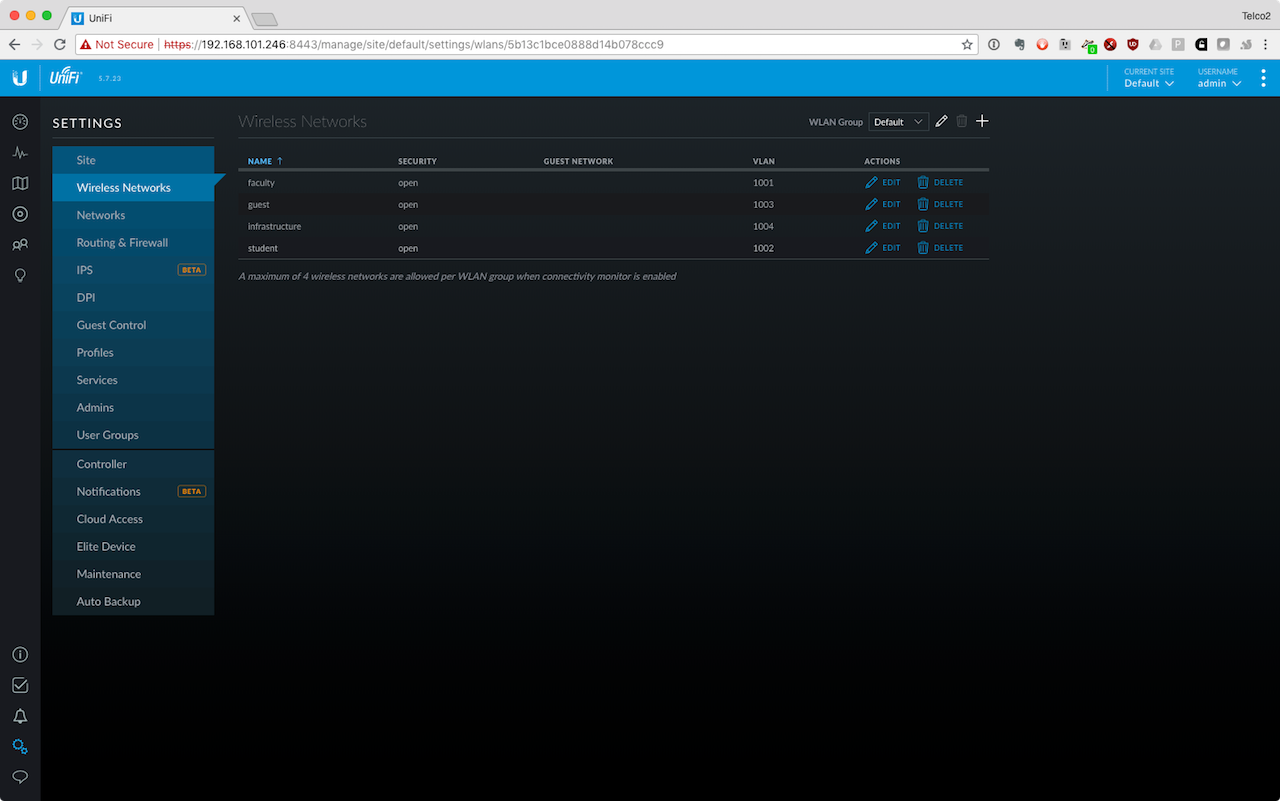
The networks should be named & VLAN addressed:
- faculty-g1, 1001
- student-g1, 1002
- guest-g1, 1003
- infrastructure-g1, 1004
When you're finished, your list of networks should look like this:
## Connect to the networks
Use your cellphone or spare laptop (the one not running the controller) to check if the networks are working. Connect to each and note the IP address and gateway of each.
Find a partner from another group. Connect to the guest network. Can you ping each other's devices? (Does your device respond to ping?)


