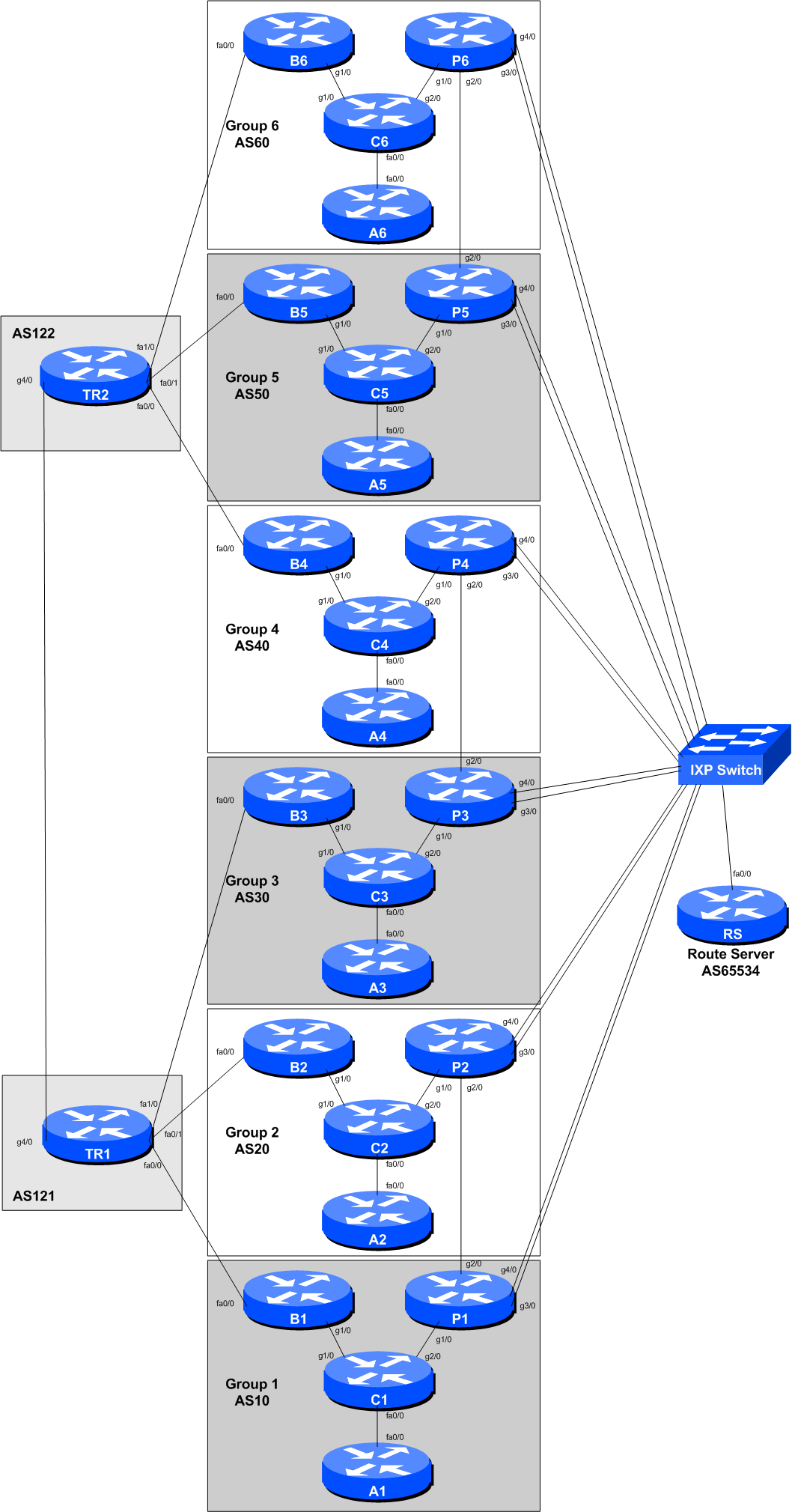
The purpose of this part of the lab is demonstrate how to do traffic engineering over two links to an IXP
The network topology has been modified by the instructors to create a second link from each group’s Peering Router (Gigabit Ethernet 4/0) to the IXP Switch.
Each group should now configure their new link to the IXP according to the above diagram.
Consult the IP Address Plan document for the address space used by the IXP. Following the document, configure the new interface on the Peering router accordingly. As this is the second interface, add 10 to the third octet as was used on GigabitEthernet 3/0 earlier. For example, if the address was 100.127.1.1 for GigabitEthernet 3/0, use 100.127.11.1 for the new interface. And for IPv6, if the original address was 2001:DB8:FFFF:1::1, use 2001:DB8:FFFF:11::1.
interface GigabitEthernet 4/0
 description Second ASX0 link to IXP
 ip address 100.127.11.X 255.255.255.0
 no ip directed-broadcast
 no ip redirects
 no ip proxy-arp
 ipv6 address 2001:DB8:FFFF:11::X/64
 ipv6 nd prefix default no-advertise
 ipv6 nd ra suppress all
 no shutdown
!
And modify the description of the existing interface to the IXP to indicate that it is now considered the first link:
interface GigabitEthernet 3/0
 description First ASX0 link to IXP
!
Do not configure IS-IS towards any IXP peer! They are not part of your autonomous system.
As before, so that traceroutes across the IXP do not break, we might wish to carry the IXP LAN address block within our IS-IS (not iBGP). To do this, we simply mark the IXP facing interface as passive in the IS-IS configuration. Here is an example:
router isis asX0
 passive-interface GigabitEthernet 4/0
We now configure eBGP on our Peering Router with the Exchange Point’s Route Server and with any bi-lateral peers we set up earlier. For bi-lateral peers, set up the peering with their new address on the IXP LAN.
We can use the configuration we created earlier - the only difference is the eBGP neighbour address.
What do you now see in the BGP table?
Which is the best path to peers across the IX? Over the new peering you set up, or over the original one?
Explain what you see to the workshop instructors.
On First Subnet, set high local pref on peerings with Group 1, 3 and 5
On First Subnet, set high MED on peerings with Group 2, 4 and 6
On Second Subnet, set high local pref on peerings with Group 2, 4 and 6
On Second Subnet, set high MED on peerings with Group 1, 3 and 5