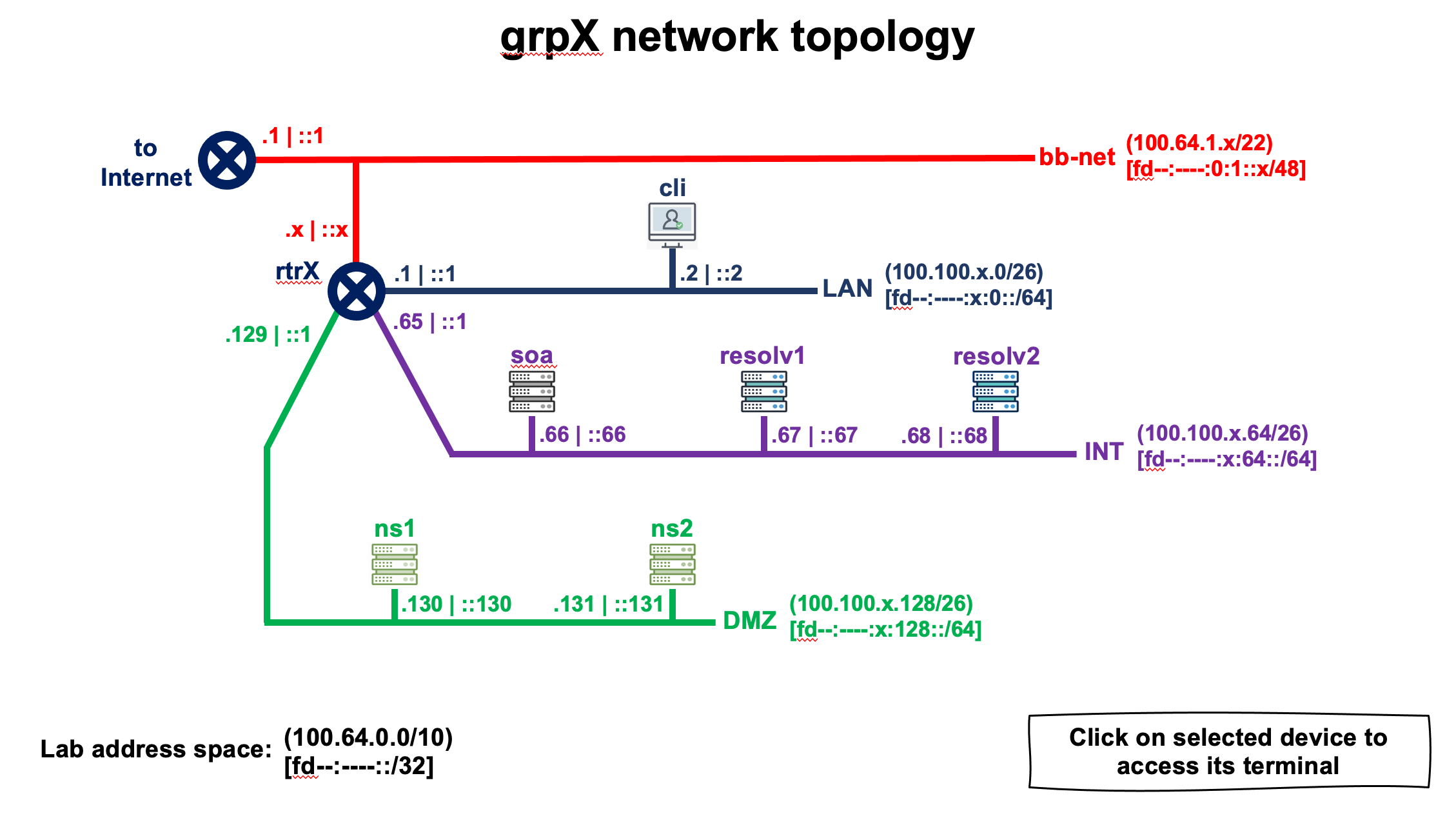
  DEVICE NAME        IPv4 ADDRESS              IPv6 ADDRESS
+--------------+-----------------------+-----------------------------+
| grpX-cli     | 100.100.X.2 (eth0)    | fd89:59e0:X::2 (eth0)       |
+--------------+-----------------------+-----------------------------+
| grpX-ns1     | 100.100.X.130 (eth0)  | fd89:59e0:X:128::130 (eth0) |
+--------------+-----------------------+-----------------------------+
| grpX-ns2     | 100.100.X.131 (eth0)  | fd89:59e0:X:128::131 (eth0) |
+--------------+-----------------------+-----------------------------+
| grpX-resolv1 | 100.100.X.67 (eth0)   | fd89:59e0:X:64::67 (eth0)   |
+--------------+-----------------------+-----------------------------+
| grpX-resolv2 | 100.100.X.68 (eth0)   | fd89:59e0:X:64::68 (eth0)   |
+--------------+-----------------------+-----------------------------+
| grpX-rtr     | 100.64.1.X (eth0)     | fd89:59e0:X::1 (eth1)       |
|              | 100.100.X.65 (eth2)   | fd89:59e0:X:64::1 (eth2)    |
|              | 100.100.X.193 (eth4)  | fd89:59e0:X:192::1 (eth4)   |
|              | 100.100.X.129 (eth3)  | fd89:59e0:X:128::1 (eth3)   |
|              | 100.100.X.1 (eth1)    | fd89:59e0:0:1::X (eth0)     |
+--------------+-----------------------+-----------------------------+
| grpX-soa     | 100.100.X.66 (eth0)   | fd89:59e0:X:64::66 (eth0)   |
+--------------+-----------------------+-----------------------------+
During this practice we are only going to access the following equipment:
NOTE: In all this lab, be carefull to always replace X by your Group number in IP addresses, server name and any other place where required. Same for <lab_domain> to be replace by the domain name registered for the class.
We are going to configure a hidden authoritative server and create the authoritative zone grpX.<lab_domain>.te-labs.training.
Our parent
(<lab_domain>.te-labs.training) has already created the following in its own zone:
; grpX
grpX             NS          ns1.grpX.<lab_domain>.te-labs.training.
grpX             NS          ns2.grpX.<lab_domain>.te-labs.training.
; ---Placeholder for grpX DS record (DO NOT MANUALLY EDIT THIS LINE)---
ns1.grpX         A           100.100.X.130
ns1.grpX         AAAA        fd89:59e0:X:128::130
ns2.grpX         A           100.100.X.131
ns2.grpX         AAAA        fd89:59e0:X:128::131
Our zone configuration must be compatible with this.
We use the container SOA
(hidden primary authoritative) [grpX-soa]
We go to the /etc/bind directory and clone the db.empty file into a new directory that we create for our zones:
$ sudo mkdir -p /etc/bind/zones
$ cp db.empty zones/db.grpX
The content of the zone should be at the least:
; grpX

$TTL    300
@       IN      SOA     grpX.<lab_domain>.te-labs.training. dnsadmin.<lab_domain>.te-labs.training. (
                              1         ; Serial
                         604800         ; Refresh
                          86400         ; Retry
                        2419200         ; Expire
                          86400 )       ; Negative Cache TTL
;

; grpX
@             NS           ns1.grpX.<lab_domain>.te-labs.training.
@             NS           ns2.grpX.<lab_domain>.te-labs.training.

ns1         A           100.100.X.130
ns1         AAAA        fd89:59e0:X:128::130
ns2         A           100.100.X.131
ns2         AAAA        fd89:59e0:X:128::131
You can add more records as you like.
When we are done, it is important to verify the zone file format. Use named-checkzone command with appropriate parameters to do that.
In the configuration file /etc/bind/named.conf.local we put the statement zone
:
zone "grpX.<lab_domain>.te-labs.training" {
        type master;
        file "/etc/bind/zones/db.grpX";
        allow-transfer { any; };
};
We restart the server and verify:
rndc reloadroot@soa:/etc/bind# dig @localhost soa grpX.<lab_domain>.te-labs.training.
; <<>> DiG 9.16.1-Ubuntu <<>> @localhost soa grpX.<lab_domain>.te-labs.training.
; (2 servers found)
;; global options: +cmd
;; Got answer:
;; ->>HEADER<<- opcode: QUERY, status: NOERROR, id: 64339
;; flags: qr aa rd ra; QUERY: 1, ANSWER: 1, AUTHORITY: 0, ADDITIONAL: 1
;; OPT PSEUDOSECTION:
; EDNS: version: 0, flags:; udp: 4096
; COOKIE: 270e2c46ed443c1c01000000609c59f04ba85015ff71998d (good)
;; QUESTION SECTION:
;grpX.<lab_domain>.te-labs.training. IN SOA
;; ANSWER SECTION:
grpX.<lab_domain>.te-labs.training. 30 IN SOA grpX.<lab_domain>.te-labs.training. dnsadmin.<lab_domain>.te-labs.training. 1 604800 86400 2419200 86400
;; Query time: 0 msec
;; SERVER: ::1#53(::1)
;; WHEN: Wed May 12 22:42:56 UTC 2021
;; MSG SIZE rcvd: 170
These servers are the ones that expose our zone publicly (so they will be open-to-all servers).
Server ns1 runs BIND (from ISC)
We go to the /etc/bind directory and create a file that will contain our zone file in the nameserver:
$ sudo mkdir -p /etc/bind/zones
$ touch /etc/bind/zones/db.grpX.slave
To do this, in the /etc/bind/named.conf.local file we configure the following parameters:
//
// Do any local configuration here
//

// Consider adding the 1918 zones here, if they are not used in your
// organization
//include "/etc/bind/zones.rfc1918";

zone "grpX.<lab_domain>.te-labs.training" {
        type slave;
        file "/etc/bind/zones/db.grpX.slave";
        masters { 100.100.X.66; };
};
We verify the configuration and if there are no errors we restart the server:
# named-checkconf
# systemctl restart bind9
We verify that it restarted correctly:
# systemctl status bind9● named.service - BIND Domain Name Server
Loaded: loaded (/lib/systemd/system/named.service; enabled; vendor preset: enabled)
Drop-In: /etc/systemd/system/service.d
└─lxc.conf
Active: active (running) since Thu 2021-05-13 04:25:43 UTC; 9s ago
Docs: man:named(8)
Main PID: 739 (named)
Tasks: 50 (limit: 152822)
Memory: 103.9M
CGroup: /system.slice/named.service
└─739 /usr/sbin/named -f -u bind
May 13 04:25:43 ns1.grpX.<lab_domain>.te-labs.training named[739]: all zones loaded
May 13 04:25:43 ns1.grpX.<lab_domain>.te-labs.training named[739]: running
May 13 04:25:43 ns1.grpX.<lab_domain>.te-labs.training named[739]: zone grpX.<lab_domain>.te-labs.training/IN: Transfer started.
May 13 04:25:43 ns1.grpX.<lab_domain>.te-labs.training named[739]: transfer of 'grpX.<lab_domain>.te-labs.training/IN' from 100.100.2.66#53: connec>
May 13 04:25:43 ns1.grpX.<lab_domain>.te-labs.training named[739]: zone grpX.<lab_domain>.te-labs.training/IN: transferred serial 1
May 13 04:25:43 ns1.grpX.<lab_domain>.te-labs.training named[739]: transfer of 'grpX.<lab_domain>.te-labs.training/IN' from 100.100.2.66#53: Transf>
May 13 04:25:43 ns1.grpX.<lab_domain>.te-labs.training named[739]: transfer of 'grpX.<lab_domain>.te-labs.training/IN' from 100.100.2.66#53: Transf>
May 13 04:25:43 ns1.grpX.<lab_domain>.te-labs.training named[739]: zone grpX.<lab_domain>.te-labs.training/IN: sending notifies (serial 1)
May 13 04:25:43 ns1.grpX.<lab_domain>.te-labs.training named[739]: managed-keys-zone: Key 20326 for zone . is now trusted (acceptance timer com>
May 13 04:25:43 ns1.grpX.<lab_domain>.te-labs.training named[739]: resolver priming query completeServer ns2 runs NSD (from NLnet Labs)
To do this, in the /etc/nsd/nsd.conf file we configure the following parameters:
# NSD configuration file for Debian.
#
# See the nsd.conf(5) man page.
#
# See /usr/share/doc/nsd/examples/nsd.conf for a commented
# reference config file.
#
# The following line includes additional configuration files from the
# /etc/nsd/nsd.conf.d directory.

include: "/etc/nsd/nsd.conf.d/*.conf"

server:
    zonesdir: "/etc/nsd"

pattern:
    name: "fromprimary"
    allow-notify: 100.100.X.66 NOKEY
    request-xfr: AXFR 100.100.X.66 NOKEY

zone:
    name: "grpX.<lab_domain>.te-labs.training"
    zonefile: "grpX.<lab_domain>.te-labs.training.forward"
    include-pattern: "fromprimary"
We verify the configuration and if there are no errors restart the server:
# nsd-checkconf /etc/nsd/nsd.conf
# systemctl restart nsd
We verify that It restarted correctly:
# systemctl status nsd● nsd.service - Name Server Daemon
Loaded: loaded (/lib/systemd/system/nsd.service; enabled; vendor preset: enabled)
Drop-In: /etc/systemd/system/service.d
└─lxc.conf
Active: active (running) since Thu 2021-05-13 05:02:35 UTC; 1min 22s ago
Docs: man:nsd(8)
Main PID: 638 (nsd)
Tasks: 3 (limit: 152822)
Memory: 114.5M
CGroup: /system.slice/nsd.service
├─638 /usr/sbin/nsd -d
├─639 /usr/sbin/nsd -d
└─640 /usr/sbin/nsd -d
May 13 05:02:35 ns2.grpX.<lab_domain>.te-labs.training systemd[1]: Starting Name Server Daemon...
May 13 05:02:35 ns2.grpX.<lab_domain>.te-labs.training nsd[638]: nsd starting (NSD 4.1.26)
May 13 05:02:35 ns2.grpX.<lab_domain>.te-labs.training nsd[638]: [2021-05-13 05:02:35.865] nsd[638]: notice: nsd starting (NSD 4.1.26)
May 13 05:02:35 ns2.grpX.<lab_domain>.te-labs.training nsd[639]: nsd started (NSD 4.1.26), pid 638
May 13 05:02:35 ns2.grpX.<lab_domain>.te-labs.training nsd[639]: [2021-05-13 05:02:35.922] nsd[639]: notice: nsd started (NSD 4.1.26), pid 638
May 13 05:02:35 ns2.grpX.<lab_domain>.te-labs.training systemd[1]: Started Name Server Daemon.We will now use dig tool to verify our own zone configuration and propagation, then do the same for one or two other groups in the class and share comments. From your client, run the following dig queries. All should return answer otherwise you should review your configurations before continiuing:
Now we try to do a manual zone transfer using ns1, ns2 and SOA server IP address from our client machine. What do you notice ?
How can we protect our zone file to prevent people get its entire content ?
Apply a change to fix the issue discussed above.
Then, test again the zone transfer. Is the issue resolved ?
Is your hidden SOA really hidden
? Try to query it from any other server and confirm wheather it replies or not. After this test, can you confirm if it is really hidden
?
How to make it a real hidden
SOA ? Do not forget that for troubleshooting purpose, you may always need to query it from some external IP addresses.
Discuss with other participants and propose a solution.
Apply the solution after you have agreed on a consensus.