This lab investigates using the newly configured RPKI support on the lab routers to explore routes with origins Valid, Invalid and Not Found.
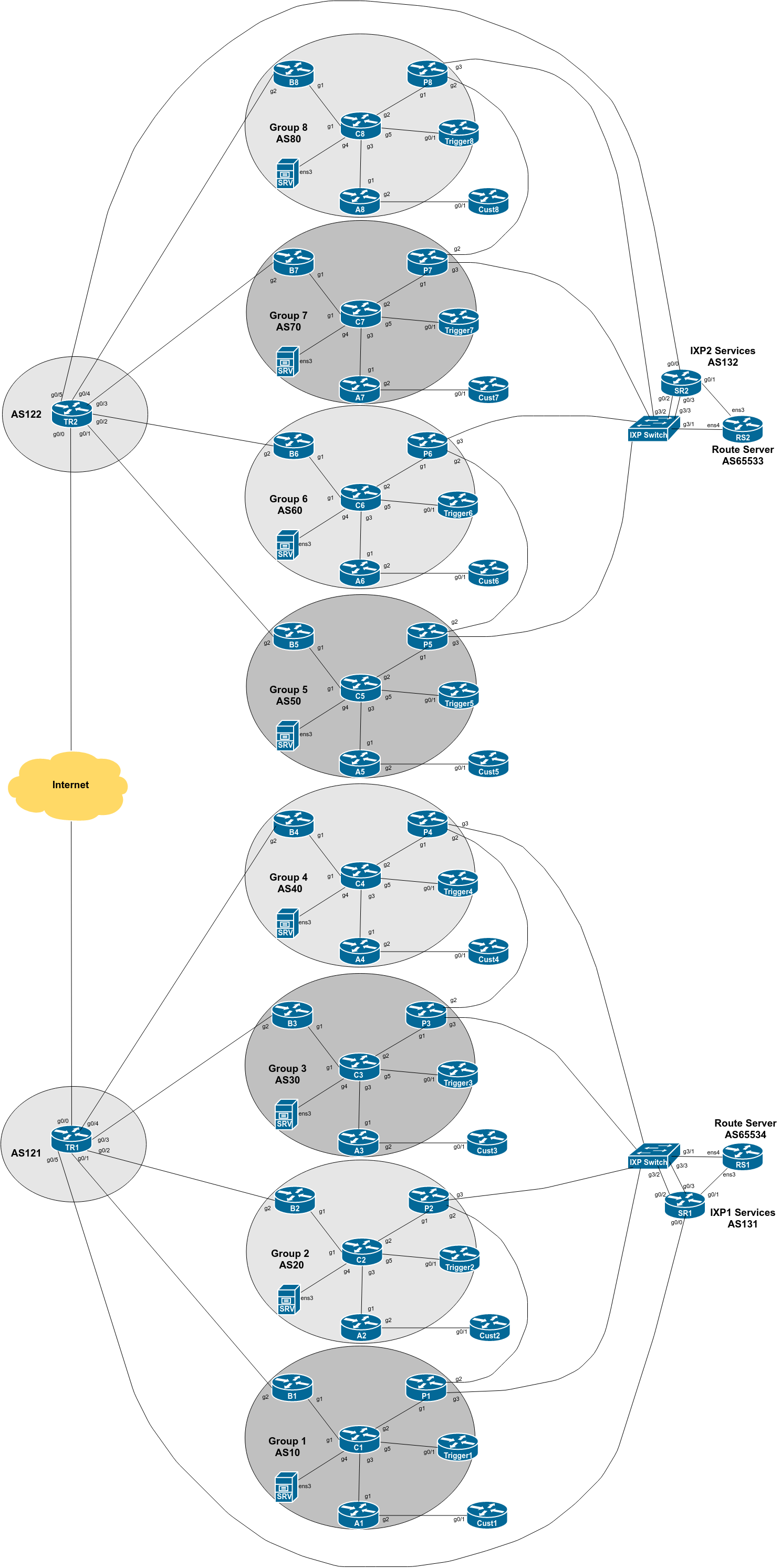
The diagram below is a reminder of the lab topology:
APNIC, one of the five RIRs, has a block of 8 ASNs and 8 IPv4 /24s available for technical training like this. ROAs are signed for the address block to be originated by the ASN listed next to it.
We will now configure the Customer Router in each group to be in the ASN listed in the following table, and to announce the address block also listed in the table.
| Group | ASN | IP address block |
|---|---|---|
| 1 | 135533 | 61.45.248.0/24 |
| 2 | 135534 | 61.45.249.0/24 |
| 3 | 135535 | 61.45.250.0/24 |
| 4 | 135536 | 61.45.251.0/24 |
| 5 | 135537 | 61.45.252.0/24 |
| 6 | 135538 | 61.45.253.0/24 |
| 7 | 135539 | 61.45.254.0/24 |
| 8 | 135540 | 61.45.255.0/24 |
We now will set up BGP on the customer router to use these AS numbers.
Check the Customer Router first. If BGP is already running using AS64512, make a note of the prefixes being originated and the peer addresses (IPv4 and IPv6 - refer to the Securing BGP Lab earlier). Once you have done this (best just to copy and paste the router bgp section into a text file), enter configuration mode and remove BGP by entering:
no router bgp 64512Then, we create a new BGP process and originate the address block as listed in the table above (include the address block we used in the earlier Securing BGP Lab). Here is an example for Group 6:
router bgp 135538
 bgp log-neighbor-changes
 bgp deterministic-med
 no bgp default ipv4-unicast
!
 address-family ipv4
  network 61.45.253.0 mask 255.255.255.0
  network 100.68.106.0 mask 255.255.255.0
  distance bgp 200 200 200
!
 address-family ipv6
  network 2001:DB8:106::/48
  distance bgp 200 200 200
!
ip route 61.45.253.0 255.255.255.0 null0
!
interface Null0
 no ip unreachables
 no ipv6 unreachables
!
Each group should modify the above example for their own needs - don’t copy and paste the above, as we will come to prefix hijacking later on in this lab!
Next we need to set up eBGP with the Access Router. First we create the prefix-lists needed, for inbound and outbound filtering - again working with Group 6 as the example:
no ip prefix-list Cust6v4
!
ip prefix-list Cust6v4 permit 61.45.253.0/24
ip prefix-list Cust6v4 permit 100.68.106.0/24
!
ip prefix-list DEFAULT-ROUTEv4 permit 0.0.0.0/0
Do the same for IPv6, noting that there is no test IPv6 prefix:
ipv6 prefix-list CustXv6 permit 2001:DB8:10X::/48
!
ipv6 prefix-list DEFAULT-ROUTEv6 permit ::/0
and then applying the configuration to the eBGP neighbour (Group 6 used as an example):
router bgp 135538
!
 address-family ipv4
  neighbor 100.68.6.34 remote-as 60
  neighbor 100.68.6.34 prefix-list Cust6v4 out
  neighbor 100.68.6.34 prefix-list DEFAULT-ROUTEv4 in
!
 address-family ipv6
  neighbor 2001:DB8:6:31:: remote-as 60
  neighbor 2001:DB8:6:31:: prefix-list Cust6v6 out
  neighbor 2001:DB8:6:31:: prefix-list DEFAULT-ROUTEv6 in
!
We now need to set up the matching configuration on the Access Router in each group’s AS. Again we need to set up prefix-lists before we set up the eBGP session - here is an example of the IPv4 prefix-list for Group 4, announcing the original customer assignment as well as the /24 we are going to use for testing ROAs:
ip prefix-list Cust4v4 permit 61.45.251.0/24
ip prefix-list Cust4v4 permit 100.68.4.64/26
!
ip prefix-list DEFAULT-ROUTEv4 permit 0.0.0.0/0
!
And the IPv6 prefix-list for all groups (we aren’t testing ROAs on any IPv6 address blocks as of now) which just announces the existing /52 assigned to the Customer:
ipv6 prefix-list CustXv6 permit 2001:DB8:X:4000::/52
!
ipv6 prefix-list DEFAULT-ROUTEv6 permit ::/0
!
Note that we don’t expect any IPv6 prefixes from the upstream provider. And then we set up the eBGP session on the access router - if there is an existing configuration coming from an earlier lab, copy it into a text editor, change the AS number, delete the neighbour on the router, and then apply the modified configuration:
router bgp 60
!
 address-family ipv4
  neighbor 100.68.6.35 remote-as 135538
  neighbor 100.68.6.35 route-map Cust6v4-in in
  neighbor 100.68.6.35 prefix-list DEFAULT-ROUTEv4 out
  neighbor 100.68.6.35 default-originate
!
 address-family ipv6
  neighbor 2001:DB8:6:31:: remote-as 135538
  neighbor 2001:DB8:6:31:: route-map Cust6v6-in in
  neighbor 2001:DB8:6:31:: prefix-list DEFAULT-ROUTEv6 out
  neighbor 2001:DB8:6:31:: default-originate
!
Note the default-originate on the eBGP session - we are announcing the default route to our customer as they do not need the full BGP table or any other routes apart from default.
Also, check on the Core Router that the test IPv4 prefix we just configured is visible. Run the show ip bgp command and check that the /24 is visible.
With your local AS now announcing a new address block, we can take advantage of our community configuration to propagate this announcement to all our peers and transits. Our outbound filter is a community based one which allows the community customer-pi out already.
But we would also want see the new prefix originated by our peers arrive at our peering router. We will now update the inbound IPv4 prefix filters to allow these new prefixes in via the private and IXP peerings. First the private peering needs to be updated to add the block announced by the neighbouring AS:
ip prefix-list ASY0-ROUTESv4 permit <new-block>/24where Y is the group number of your private peer group. The IXP-RSv4 IPv4 prefix-list needs to be updated to add the 8 new prefixes being originated:
ip prefix-list IXP-RSv4 permit 61.45.248.0/24
ip prefix-list IXP-RSv4 permit 61.45.249.0/24
ip prefix-list IXP-RSv4 permit 61.45.250.0/24
ip prefix-list IXP-RSv4 permit 61.45.251.0/24
ip prefix-list IXP-RSv4 permit 61.45.252.0/24
ip prefix-list IXP-RSv4 permit 61.45.253.0/24
ip prefix-list IXP-RSv4 permit 61.45.254.0/24
ip prefix-list IXP-RSv4 permit 61.45.255.0/24
Once the prefix-list filters have been updated1, refresh the EBGP sessions on the Peering Router. After that you should see the new address blocks in the BGP table.
Now that we have announced the prefix from the Customer to inside our ASN, go to the Border and Peering Routers and check the validation state. Try showing the BGP table entry for the /24 prefix learned from your customer (Group 6 used as an example):
B6>show ip bgp 61.45.253.0What do you see?
The output should look similar to below:
B6>show ip bgp 61.45.253.0
BGP routing table entry for 61.45.253.0/24, version 67
BGP Bestpath: deterministic-med
Paths: (1 available, best #1, table default)
  Advertised to update-groups:
     1
  Refresh Epoch 1
  135538
    100.68.6.4 (metric 4) from 100.68.6.2 (100.68.6.2)
      Origin IGP, metric 0, localpref 100, valid, internal, best
      Community: 60:1005
      Originator: 100.68.6.4, Cluster list: 100.68.6.2
      path 67426B0C RPKI State valid
Note the last line in the output - do you see the words RPKI State valid as shown above?
The workshop instructors will have originated some prefixes which are known invalids at the start of this lab from the two Transit AS2. Check the validation state of those prefixes. They will let you know what the prefixes are at the start of this lab. Run the command:
show ip bgp <instructor-prefix>What do you see?
The output should look similar to below:
B6>sh ip bgp 1.1.1.0
BGP routing table entry for 1.1.1.0/24, version 0
BGP Bestpath: deterministic-med
Paths: (1 available, no best path)
  Not advertised to any peer
  Refresh Epoch 1
  122 121
    100.122.1.4 from 100.122.1.4 (100.122.1.4)
      Origin IGP, localpref 50, valid, external
      path 674269BC RPKI State invalid
Note the last line in the output - do you see the words RPKI State invalid ?
Why do you think the router is saying that the RPKI state is invalid? Refer to the presentation if you are not sure.
What do you see on the Core Router when you check the validation state of your newly originated prefix, or the prefix the instructors originated, or the prefixes originated by your peers?
Discussion: The instructors will demonstrate what is seen on the Core Router on the class projector. Can you explain what you are seeing in the BGP table here? Any surprises?
The instructors may have originated other prefixes from the Transit routers, just so you can check validation states of those. Again, these should all be invalid - confirm with the instructors and show them the results you see in your BGP table.
Here is part of the BGP table as seen on Group 4’s Border Router from a previous version of this workshop:
B4>sh ip bgp
BGP table version is 21, local router ID is 100.68.4.1
Status codes: s suppressed, d damped, h history, * valid, > best, i - internal,
              r RIB-failure, S Stale, m multipath, b backup-path, f RT-Filter,
              x best-external, a additional-path, c RIB-compressed,
              t secondary path,
Origin codes: i - IGP, e - EGP, ? - incomplete
RPKI validation codes: V valid, I invalid, N Not found

     Network          Next Hop        Metric LocPrf Weight Path
N*>   0.0.0.0          100.121.1.6                            0 121 i
V*>i  61.45.248.0/24   100.68.4.3               0    150      0 10 135533 i
V*                     100.121.1.6                    50      0 121 10 135533 i
V*>i  61.45.249.0/24   100.68.4.3               0    150      0 20 135534 i
V*                     100.121.1.6                    50      0 121 20 135534 i
V*>i  61.45.250.0/24   100.68.4.3               0    200      0 30 135535 i
V*                     100.121.1.6                    50      0 121 30 135535 i
V*>i  61.45.251.0/24   100.68.4.4               0    100      0 135536 i
V*>   61.45.252.0/24   100.121.1.6                    50      0 121 122 50 135537 i
V*>   61.45.253.0/24   100.121.1.6                    50      0 121 122 60 135538 i
V*>   61.45.254.0/24   100.121.1.6                    50      0 121 122 70 135539 i
V*>   61.45.255.0/24   100.121.1.6                    50      0 121 122 80 135540 i
...
The default state for any prefix not present in the validator cache is called Not Found. If you check all3 the other prefixes in the BGP table you will see they are listed as Not Found. Their ROAs have not been signed (and indeed being private address space are unlikely to ever be signed as they are not routed on the public Internet).
This lab has shown how to investigate whether a prefix’s origin has been validated by the owner, and shown what happens when invalid announcements are made.
Is there a more efficient way of doing this? Note that 61.45.248.0/24 through to 61.45.255.0/24 are subnets of 61.45.248.0/21 - so we could instead add one line saying permit 61.45.248.0/21 ge 24 le 24 which would match only /24s out of this /21.↩︎
The instructors will use well known prefixes with existing ROAs, but will originate them from the AS121 on the TR1 router. Prefixes will likely include 1.0.0.0/24 and 1.1.1.0/24 - the instructors will note these on the classroom whiteboard.↩︎
There is an implementation error in Cisco IOS whereby prefixes which have validation state Not Found are passed on in iBGP as Valid. This is counter to the IETF standard.↩︎