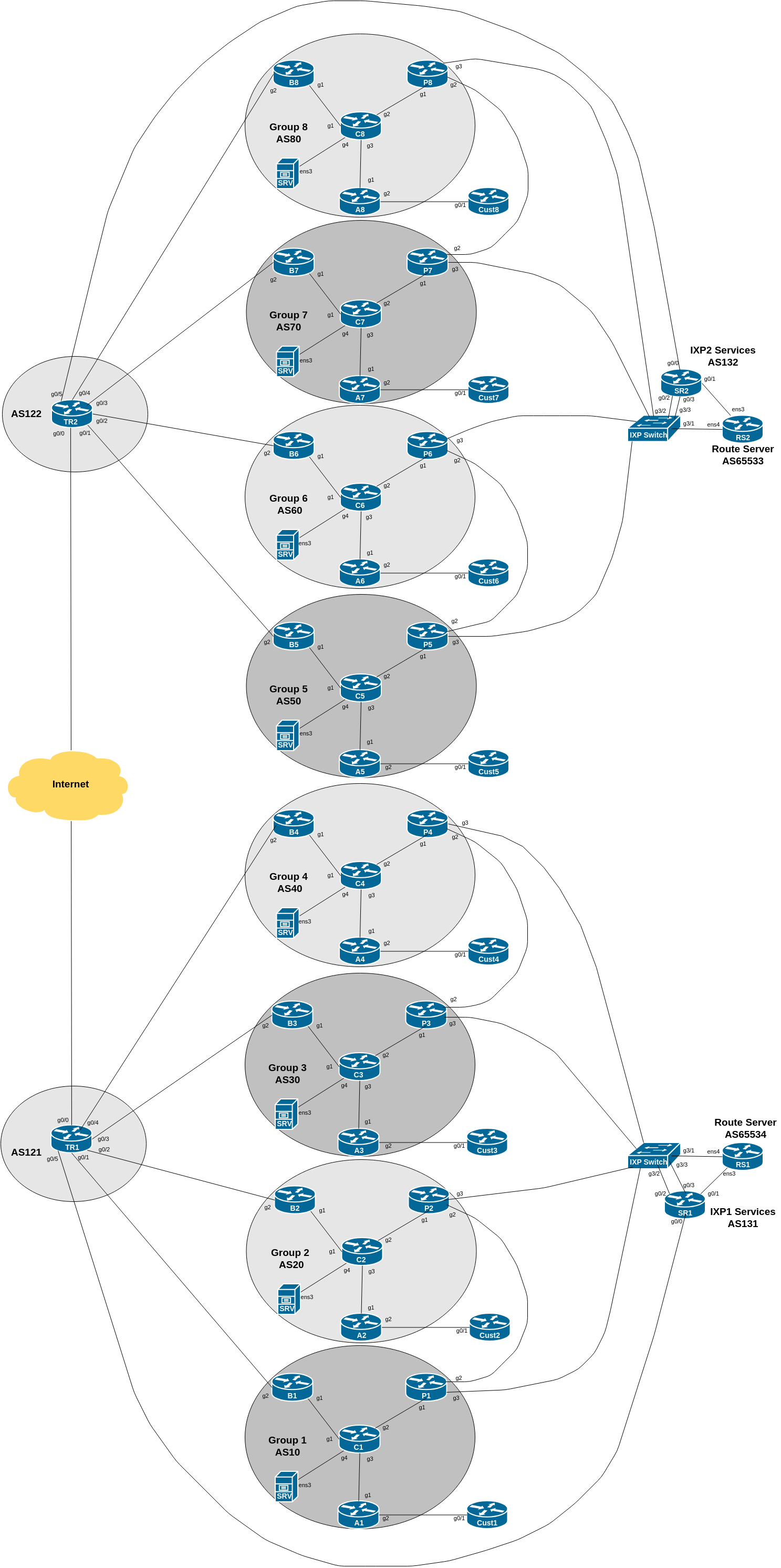
This lab is focused on taking our existing infrastructure and implementing some of the BGP Best Practices to secure the configuration on the router, as covered in the BGP BCP presentation earlier.
The lab work looks at 4 essential configuration features necessary to secure BGP operations on a router:
Limiting the maximum AS-PATH length for received prefixes
Protecting the EBGP Peerings from receiving more than the expected number of prefixes
Generalised TTL Security Mechanism - how to prevent remote attackers from disrupting EBGP sessions
Preventing the propagation of private AS numbers to the Internet
The diagram below is a reminder of the lab topology:
The next protection and preventative measure we will look at is setting a limit on the maximum number of prefixes receivable from an EBGP peer. This activity is vitally important to help keep the routing system stable and deal with issues due to missing or erroneous filters applied to EBGP sessions.
For example, if two networks peer with each other, and exchange 10 prefixes they each originate, then they’d reasonably expect to receive no more than 10 prefixes from each other. If each operator was following best practices, they’d set up a strict prefix filter to only allow the specific filters they’d expect from their peer.
However, it isn’t always possible to set up strict filters, so another protective measure is required. This is usually the case where the network operator is receiving a large number of prefixes from another peer and all the customers of this peer as well. While they may be able to filter from the direct peer, it is harder to filter what the peer’s customers are sending as they don’t have that direct knowledge/relationship, and are not using the Internet Routing Registry (which was designed for this very purpose). This assumes and trusts that their peer will filter their customer and their own announcements according to best practices - but what happens if this filter breaks? A peering which might be exchanging 2000 IPv4 prefixes could end up exchanging the entire global IPv4 table instead, all of 810000 prefixes at time of writing these notes.
The classic well known example is of two upstream providers with an access provider as their customer. The access provider received full routes from both upstreams. A mis-configuration by the access provider on one of its upstream links during maintenance work resulted in the full routes from one upstream provider being sent to the other upstream provider. And because upstream provider policy is to give high preference to customer routes, they ended up giving high preference to the global routing table learned via their customer; higher preference than their own upstream links. Which resulted in their transit traffic going via their customer out to the other upstream. This caused a major outage for both upstream providers and for their mutual customer. And could have been easily prevented by proper prefix filter or, in the absence of that, at least implementing the maximum-prefix concept we are now about to configure.
We are now going to implement Cisco IOS maximum-prefix on all our EBGP sessions. The Cisco command has several options, as described in the presentation:
neighbor <x.x.x.x> maximum-prefix <max> [restart N] [<threshold>] [warning-only] The options are:
restart is an optional keyword which will restart the BGP session N minutes after being torn down. This is useful in the case where the EBGP session can be restored after waiting, just in case the prefix overflow was caused by a maintenance error on the peer network.
threshold is an optional parameter between 1 to 100, specifying the percentage of max that will cause a warning message to be generated. Default is 75%.
warning-only is an optional keyword which allows log messages to be generated but peering session will not be torn down - use this with care because if the log messages are not being monitored, the EBGP session could overflow resulting in an outcome similar to the scenario described earlier.
Determine how many prefixes you are currently receiving on all your EBGP sessions. Once you have done that, double the number, and use that for the appropriate EBGP session.
We suggest using 30 as the maximum-prefix as this will allow for future scenarios in this lab - do not make it bigger than 30 otherwise you may not see the effect of applying maximum-prefix to the BGP session when the instructors inject more prefixes into the network.
Here is an example for the Border Router, peering with the upstream provider:
router bgp X0
!
 address-family ipv4
  neighbor <ipv4-ptp> maximum-prefix 30
!
 address-family ipv6
  neighbor <ipv6-ptp> maximum-prefix 30
!
To maintain consistency, do the same for the EBGP sessions on the Peering router. Your group is currently receiving 4 prefixes from the IX Route Server, and later in this particular lab you will receive another 3, so perhaps set the maximum-prefix threshold here to be 15.
You will only be getting one prefix from your private peer - setting maximum-prefix to 2 might be a bit strict, so perhaps set it to 5 instead, which will allow for the 75% threshold warning to notify you of problems first.
Once you have put the configuration in place, let the lab instructors know. They will now “accidentally” send a large number of prefixes on the EBGP session with your group’s border router. What happens now?
You should see that the BGP session will be disabled as soon as the maximum prefix threshold has been passed. Run the show ip bgp and show bgp ipv6 unicast commands. You should see something like this (for router B1 in an earlier version of this lab):
B1#sh ip bgp sum

Neighbor        V     AS MsgRcvd MsgSent   TblVer  InQ OutQ Up/Down  State/PfxRcd
100.68.1.2      4     10      62      57       39    0    0 00:47:23        8
100.121.1.0     4    121       0       0        1    0    0 00:00:38 Idle (PfxCt)
The PfxCt comment under the State/PfxRcd column shows that the maximum-prefixes allowed has been exceeded for this peering, and the router has disabled the BGP session.
Run the show log command and check what the router logs have recorded. You might see something like this:
%BGP-4-MAXPFX: Number of prefixes received from 100.121.1.0 (afi 0) reaches 19, max 25
%BGP-3-MAXPFXEXCEED: Number of prefixes received from 100.121.1.0 (afi 0): 26 exceeds limit 25
%BGP-5-NBR_RESET: Neighbor 100.121.1.0 reset (Peer over prefix limit)
Note the first entry %BGP-4-MAXPFX is the router warning the operator that the 75% threshold has been reached. The second entry %BGP-3-MAXPFX-EXCEED warns that the limit has been exceeded. And the %BGP-5-NBR_RESET has reset the BGP session because of this.
Once the instructors are satisfied with the maximum-prefix demonstration, they will withdraw the extra prefixes they have introduced into the workshop lab network.
Notice that the Border router will not automatically restore the BGP session. You will need to do a manual hard reset of the BGP session before it is restored.
If you had set warning-only as an option, the EBGP sessions wouldn’t have been taken down - they’d have kept running, but kept sending warning messages while the BGP peering was receiving more prefixes than configured.
If you had set a restart time, then the border router would have tried to restart the peering session every period that you had set for the restart.
If there is time, experiment with these two options and see what happens to the EBGP sessions each time.
This lab has shown how to protect against more than expected number of prefixes received on EBGP sessions. It is recommended to consider implementing such a limit (30%-50% above expected numbers from a peer) on all EBGP sessions configured on the network.