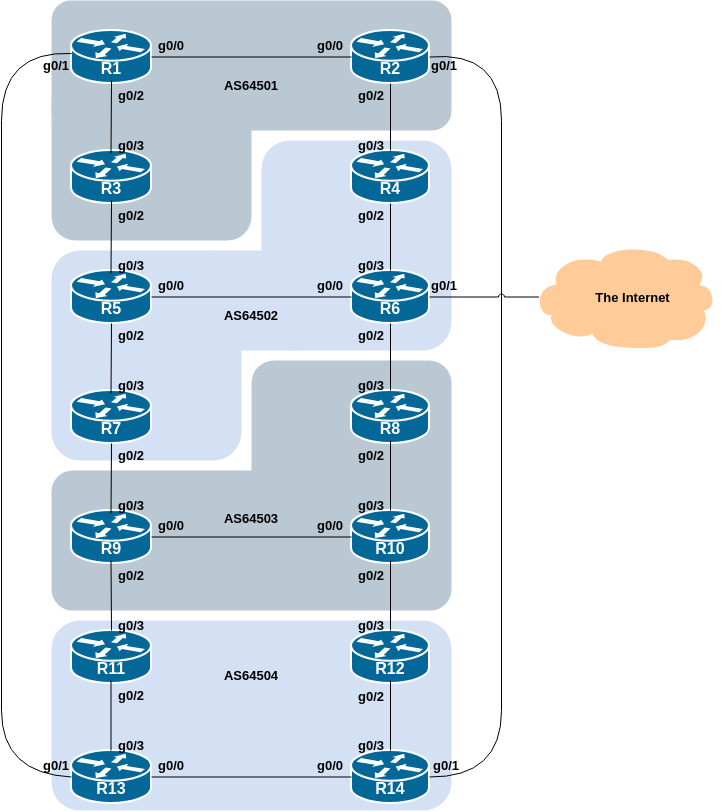
This lab is the final in a series demonstrating how to filter BGP announcements between neighbouring ASes. Four techniques will be covered in this series: prefix-list, as-path filters, route-maps and BGP communities.
The following common topology is used for this lab.
Before we start this lab, we need to clean up from the route-map and community lab we just completed, ready to test the final example, looking at using BGP communities for more advanced techniques.
The following shows what needs to be done in configuration mode:
router bgp 6450X
 address-family ipv4
  no neighbor <ebgp-peer> route-map <outmapv4> out
 address-family ipv6
  no neighbor <ebgp-peer> route-map <outmapv6> out
!
no route-map <outmapv4>
no route-map <outmapv6>
!
no ip prefix-list AS6450X-v4
no ipv6 prefix-list AS6450X-v6
end
Replace the X and entries in <brackets> with the names you used.
Once you have done this, remember to do the Route Refresh on the EBGP sessions! (It’s simplest just to do clear bgp all <ext-AS> in and clear bgp all <ext-AS> out.) After that the full BGP table should be restored and you will see all the routes in the network again.
In the previous scenario, the community a network belongs to was generated at the point where one BGP router spoke to another BGP router. While this situation is valuable in demonstrating how to set communities, the more common scenario is where an ISP attaches a community to a network when the network is injected into the BGP routing table.
Each router team should assign a community to the customer network block (the IPv4 /28 and IPv6 /56) they originate in BGP. Review the BGP documentation to find out how to do this. Each router should set a community of format [AS number]:[Router number] exactly as in the previous step.
Here is an example of the configuration Router3 might use:
ip bgp-community new-format
!
route-map community-tag permit 10
 set community 64501:3
!
router bgp 64501
 address-family ipv4
  network 100.68.1.64 mask 255.255.255.240 route-map community-tag
  neighbor 100.68.2.0 remote-as 64502
  neighbor 100.68.2.0 send-community
!
 address-family ipv6
  network 2001:DB8:1:300::/56 route-map community-tag
  neighbor 2001:DB8:2:1:: remote-as 64502
  neighbor 2001:DB8:2:1:: send-community
!
ip route 100.68.1.64 255.255.255.240 null0
ipv6 route 2001:DB8:1:300::/56 null0
!
Use this example to design a configuration for your EBGP peering with your external neighbour.
Note that Router2 and Router9 have two EBGP neighbours - remember to add the send-community configuration to both EBGP peering sessions.
Once completed, check that the network appears with its community in the BGP routing table. A simple show ip bgp <network> and show bgp ipv6 unicast <network> on the local router should indicate the community attached to the prefix.
Question: Why do your external, but not your internal, peers see the community set on the network?
Answer: See earlier. All peerings require the BGP send-community subcommand for the community attribute to be sent between BGP peers.
Following on from the previous step, now set up the internal peerings so that the community attribute for your network is sent to local peers.
Hint: to do this, simply add in the configuration line neighbor <ibgp-peer> send-community for all IBGP peerings (both IPv4 and IPv6). Don’t forget to refresh the BGP peering sessions so that the configuration change can be implemented.
The aim in this final section of our series of Route Filtering labs is to combine what we have learned in the previous labs to implement some more advanced BGP filtering and policies.
First, we will only accept networks which are originated by and received from the neighbouring external BGP peer. (This is similar to what was being attempted in the first two labs with prefix and AS_PATH filtering.)
For example, Router11 should only accept the subnet originated by Router9, and should use the knowledge of the community Router9 has attached to the subnet to achieve this.
Here is a configuration example that Router11 could use:
ip community-list standard R9 permit 64503:9
!
route-map AS64503-in permit 10
 match community R9
!
router bgp 64504
 address-family ipv4
  neighbor 100.68.3.6 route-map AS64503-in in
!
 address-family ipv6
  neighbour 2001:DB8:3:4:: route-map AS64503-in in
!
Use this example to design a configuration for your EBGP peering with your external neighbour.
Note that Router2 and Router9 have two EBGP neighbours in different ASes, so will need a different community-list and route-map for each one.
The community-list name choice is up to each router team – it is not announced in any BGP peering or used in any other way apart from identifying the community-list. But the industry standard practice is to use a name that describes what the community-list is doing - and in this case using a name matching the remote ASN makes the most sense!
We will now set local-preference on the routes matching the community filter in the previous step. Retain the route-map; an additional configuration line will be added to it. You also want to allow the other networks heard through the filters with the local-preference set to the default value.
Question: Why?
Answer: Without the second permit directive the route-map implements a default deny and no other prefixes will be passed through.
Here is the updated route-map configuration that Router11 would need achieve this change:
route-map AS64503-in permit 10
 match community R9
 set local-preference 120
!
route-map AS64503-in permit 20
!
Note that after a new policy is set, the BGP session needs to be refreshed so that the new policy can then be applied. The router does not automatically keep all the updates it ever received from the peer so this is necessary. This is done by using the clear ip bgp <peer> in and clear bgp ipv6 unicast <peer> exec commands.
Now check the BGP table. You should see the prefixes originated by your directly attached EBGP having local-preference 120 attached to them, and all other prefixes in the across the lab topology visible again, and with the default local-preference of 100. This should mean you will see four prefixes with local-preference 120, and the remaining prefixes with local-preference 100.
This module has introduced some of the basic features available to configure BGP peerings in Cisco IOS. The reader is encouraged to try further permutations of the configuration examples given here. Community usage is gaining in popularity as the feature is now recognised to give considerable advantages in controlling routing policy between different ASes. Route refresh and peer-groups are also widely used in ISP backbones as they considerably ease administration and configuration of an operational network.
Why is making use of Route Refresh the best way of implementing new BGP policy?
Why do AS_PATH filters provide less granularity then prefix-filters for filtering a BGP session? And which is preferred in an ISP network, and why?
When should the community attribute be set on a BGP prefix?
Does IOS send BGP communities by default for IBGP? For EBGP? If not, what must operators remember to do?