This lab is focused on taking our existing infrastructure and implementing some of the BGP Best Practices to secure the configuration on the router, as covered in the BGP BCP presentation earlier.
The lab work looks at 4 essential configuration features necessary to secure BGP operations on a router:
Limiting the maximum AS-PATH length for received prefixes
Protecting the EBGP Peerings from receiving more than the expected number of prefixes
Generalised TTL Security Mechanism - how to prevent remote attackers from disrupting EBGP sessions
Preventing the propagation of private AS numbers to the Internet
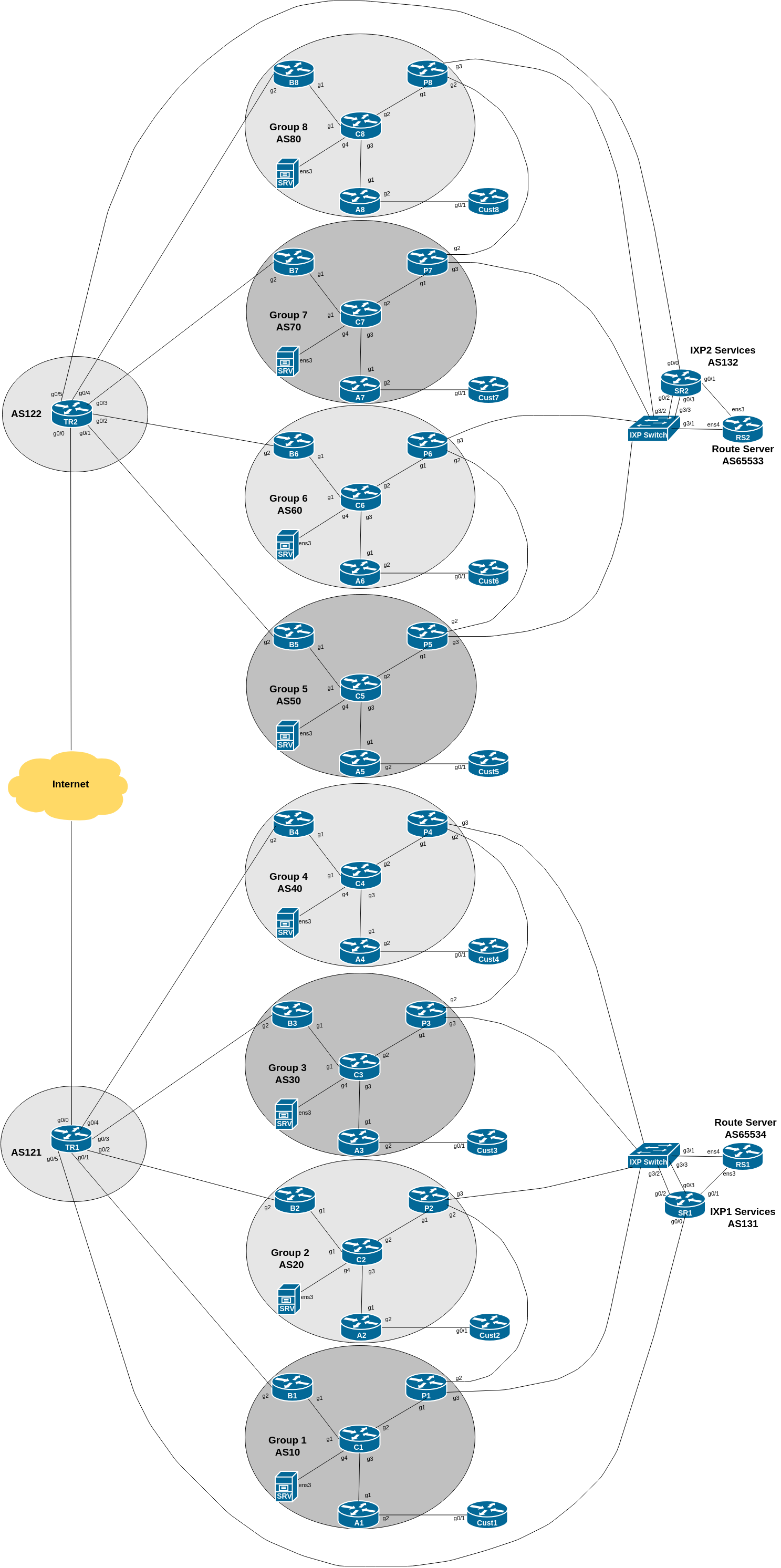
The diagram below is a reminder of the lab topology:
The final exercise in this lab is to include a command/configuration to drop any prefixes originated from private AS numbers used within the network.
Many network operators will use private AS numbers internally in their networks, either for test labs, individual offices, or customer dual-homing, or other features where AS numbers are needed, but do not need to be announced globally. As per Section 10 of RFC1930, private AS numbers must not be announced to the global Internet.
However, what happens if an operator needs to announce a prefix originated by one of these private ASes out to the public Internet. The original method would be that the operator originates the prefix from its own public autonomous system, overriding the origination done by the connected private AS. This works up to a point, but causes problems if the network using the private AS disconnects from its upstream - the upstream will still originate the prefix. The vendors introduce a feature to remove the private ASN from the AS-PATH - this gave the appearance of the prefix being originated from the upstream public ASN instead. So rather than:
100.64.0.0/16 100 200 64512appearing in the global Internet (illegal AS announcement), the actual prefix announcement would be:
100.64.0.0/16 100 200RFC6996 extended the range of private AS numbers to include AS numbers from 4,200,000,000 to 4,294,967,294 - these are useful for larger networks which have used up the original 1023 reserved by RFC1930.
We now will set up BGP on the Customer Router. Rather than using the IPv4 and IPv6 space assigned to the customer for testing purposes earlier on in the workshop, we will use a separate address block.
The new address block is listed in the Address Plan under the Customer Provider Independent section. Refer to the address plan, and make a note of your IPv4 and IPv6 address blocks.
Next, we create the process using the private AS number 64512 and originate the address block in question. Here is an example configuration:
router bgp 64512
 bgp log-neighbor-changes
 bgp deterministic-med
 no bgp default ipv4-unicast
!
 address-family ipv4
  distance bgp 200 200 200
  network 100.68.10X.0 mask 255.255.255.0
!
 address-family ipv6
  distance bgp 200 200 200
  network 2001:DB8:10X::/48
!
ip route 100.68.10X.0 255.255.255.0 null0
ipv6 route 2001:DB8:10X::/48 null0
!
Next we need to set up eBGP with the Access Router. First we create the prefix-lists needed, for inbound and outbound filtering:
ip prefix-list CustXv4 permit 100.68.10X.0/24
!
ip prefix-list DEFAULT-ROUTEv4 permit 0.0.0.0/0
Do the same for IPv6:
ipv6 prefix-list CustXv6 permit 2001:DB8:10X::/48
!
ipv6 prefix-list DEFAULT-ROUTEv6 permit ::/0
and then applying the configuration to the eBGP neighbour:
router bgp 64512
!
 address-family ipv4
  neighbor 100.68.X.34 remote-as X0
  neighbor 100.68.X.34 description eBGP with ASX0
  neighbor 100.68.X.34 prefix-list CustXv4 out
  neighbor 100.68.X.34 prefix-list DEFAULT-ROUTEv4 in
!
 address-family ipv6
  neighbor 2001:DB8:X:31:: remote-as X0
  neighbor 2001:DB8:X:31:: description eBGP with ASX0
  neighbor 2001:DB8:X:31:: prefix-list CustXv6 out
  neighbor 2001:DB8:X:31:: prefix-list DEFAULT-ROUTEv6 in
!
We now need to set up the matching configuration on the Access Router in each group’s AS. Again we need to set up prefix-lists before we set up the eBGP session - here is an example of the IPv4 prefix-list for all groups:
ip prefix-list CustXv4 permit 100.68.10X.0/24
!
ip prefix-list DEFAULT-ROUTEv4 permit 0.0.0.0/0
!
And the IPv6 prefix-list for all groups:
ipv6 prefix-list CustXv6 permit 2001:DB8:10X::/48
!
ipv6 prefix-list DEFAULT-ROUTEv6 permit ::/0
!
We then create the route-maps used on the Access router for handling prefixes received from the Customer router. Because we are now getting a customer originated route from a provider independent block, we need to tag it with the correct community. Refer to the earlier ibgp lab - we noted that Customer independent addresses (which this one) go into community AS:1005.
The IPv4 route-map looks like this:
route-map CustXv4-in permit 5
 description Filter inbound prefixes from AS64512
 match ip address prefix-list CustXv4
 set community X0:1005
!
and this for IPv6:
route-map CustXv6-in permit 5
 description Filter inbound prefixes from AS64512
 match ipv6 address prefix-list CustXv6
 set community X0:1005
!
We are now ready to set up the eBGP session on the Access router:
router bgp X0
!
 address-family ipv4
  neighbor 100.68.X.35 remote-as 64512
  neighbor 100.68.X.35 description eBGP with Customer
  neighbor 100.68.X.35 route-map CustXv4-in in
  neighbor 100.68.X.35 prefix-list DEFAULT-ROUTEv4 out
  neighbor 100.68.X.35 default-originate
!
 address-family ipv6
  neighbor 2001:DB8:X:31::1 remote-as 64512
  neighbor 2001:DB8:X:31::1 description eBGP with Customer
  neighbor 2001:DB8:X:31::1 route-map CustXv6-in in
  neighbor 2001:DB8:X:31::1 prefix-list DEFAULT-ROUTEv6 out
  neighbor 2001:DB8:X:31::1 default-originate
!
Note the default-originate on the eBGP session - we are announcing the default route to our customer as they do not need the full BGP table or any other routes apart from default.
Once the Access Router is configured, we can now go back to the Customer Router and remove the static default routes for IPv4 and IPv6:
no ip route 0.0.0.0 0.0.0.0 100.68.X.34
no ipv6 route ::/0 2001:DB8:X:31::
Confirm that connectivity still works, as you did earlier on in the eBGP lab - routing between the Customer Router and its upstream should now be relying on BGP.
Now check on the Core Router for the prefix announcements originated by the Customer Router, and being transited by the Access Router. Use the sh ip bgp and sh bgp ipv6 unicast commands to find out the state of the IPv4 and IPv6 BGP tables. What do you see?
You should see that the 100.68.10X.0/24 and 2001:DB8:10X::/48 prefixes are being originated from AS 64512. Here is an example from the Border Router in Group 1 from a previous version of this lab:
B1#show bgp ipv4 unicast 100.68.101.0
BGP routing table entry for 100.68.101.0/24, version 15
BGP Bestpath: deterministic-med
Paths: (1 available, best #1, table default)
  Advertised to update-groups:
     1
  Refresh Epoch 1
  64512
    100.68.1.4 (metric 4) from 100.68.1.2 (100.68.1.2)
      Origin IGP, metric 0, localpref 100, valid, internal, best
      Community: 10:1005
      Originator: 100.68.1.4, Cluster list: 100.68.1.2
      rx pathid: 0, tx pathid: 0x0
Compare the above with what you see. Also check the IPv6 status. You should see an output similar to the following:
B1#show bgp ipv6 unicast 2001:DB8:101::/48
BGP routing table entry for 2001:DB8:101::/48, version 15
BGP Bestpath: deterministic-med
Paths: (1 available, best #1, table default)
  Advertised to update-groups:
     1
  Refresh Epoch 1
  64512
    2001:DB8:1::4 (metric 4) from 2001:DB8:1::2 (100.68.1.2)
      Origin IGP, metric 0, localpref 100, valid, internal, best
      Community: 10:1005
      Originator: 100.68.1.4, Cluster list: 100.68.1.2
      rx pathid: 0, tx pathid: 0x0
Are you able to explain everything you see in the show bgp outputs above?
Ask your peers and upstreams if they see any prefix announcements coming from you with AS64512 as the origin AS.
We cannot allow this private AS to leak out to the Internet or to private peers, so we need to fix our EBGP sessions.
We will now modify our EBGP peering sessions to strip out any private AS number which might appear as the origin AS in any announcements we make to our neighbours. The Cisco IOS command to do this is remove-private-as.
Here is an example for the Border Router, peering with the upstream provider:
router bgp X0
!
 address-family ipv4
  neighbor <ipv4-ptp> remove-private-as
!
 address-family ipv6
  neighbor <ipv6-ptp> remove-private-as
!
which will remove the private AS from any prefixes we originate in internal autonomous networks. Remember to apply a route-refresh once you have added this configuration.
Don’t forget to apply the remove-private-AS configuration to the eBGP configurations on the Peering Router as well! This is why the BGP Best Practices presentation mentions and recommends the use of standard templates for IBGP and EBGP configurations.
Also, don’t forget to update your inbound prefix filters on the Peering Router to allow your peers to send you these new prefixes. This means updating the prefix-lists IXP-RSv4 and IXP-RSv6 to allow these extra prefixes in.
You also need to update the inbound prefix-lists ASY0-ROUTESv4 and ASY0-ROUTESv6 for the private peering between your group and the adjacent group. They will end up looking like this for IPv4:
ip prefix-list ASY0-ROUTESv4 permit 100.68.Y.0/24
ip prefix-list ASY0-ROUTESv4 permit 100.68.10Y.0/24
and this for IPv6:
ipv6 prefix-list ASY0-ROUTESv6 permit 2001:DB8:Y::/48
ipv6 prefix-list ASY0-ROUTESv6 permit 2001:DB8:10Y::/48
Remember to replace the Y in the above examples with the neighbouring Group’s number!
Once you have updated the Peering Router EBGP configuration, don’t forget the route-refresh inbound so that the new prefixes are allowed through the new filters.
Once we have added the remove-private-as configuration on all our EBGP sessions, we need to do some testing to show that this works.
What do you see now?
Do your neighbours see any prefixes coming from you which are originated from private ASes?
Note 1: Cisco’s remove-private-as command only applies to AS numbers from 64512 to 65534. For the remaining private AS numbers (4200000000 and above) you will need to proxy the prefix announcement from the Access Router. Do you know how to do this1?
Note 2: If you are using documentation AS numbers (64496 to 64511 and 65536 to 65551) for internal use, you will also need to proxy the prefix announcement from the Access Router.
This lab has shown how to strip private ASNs from BGP announcements sent to external neighbours. It is recommended to implement this on all EBGP sessions configured on the network.
Hint: How are the original IPv4 /26 and IPv6 /52 address blocks currently being announced?↩︎